
Kubernetes security is about protecting every layer of your cluster: the control plane, the nodes, the workloads running on it and the pipeline that delivers them. Kubernetes is powerful, but its defaults favour ease of use, so a cluster needs deliberate hardening before it runs sensitive workloads.
This practical checklist covers the essentials. It applies to self-managed clusters as well as managed services such as Amazon EKS, Azure AKS and Google GKE.
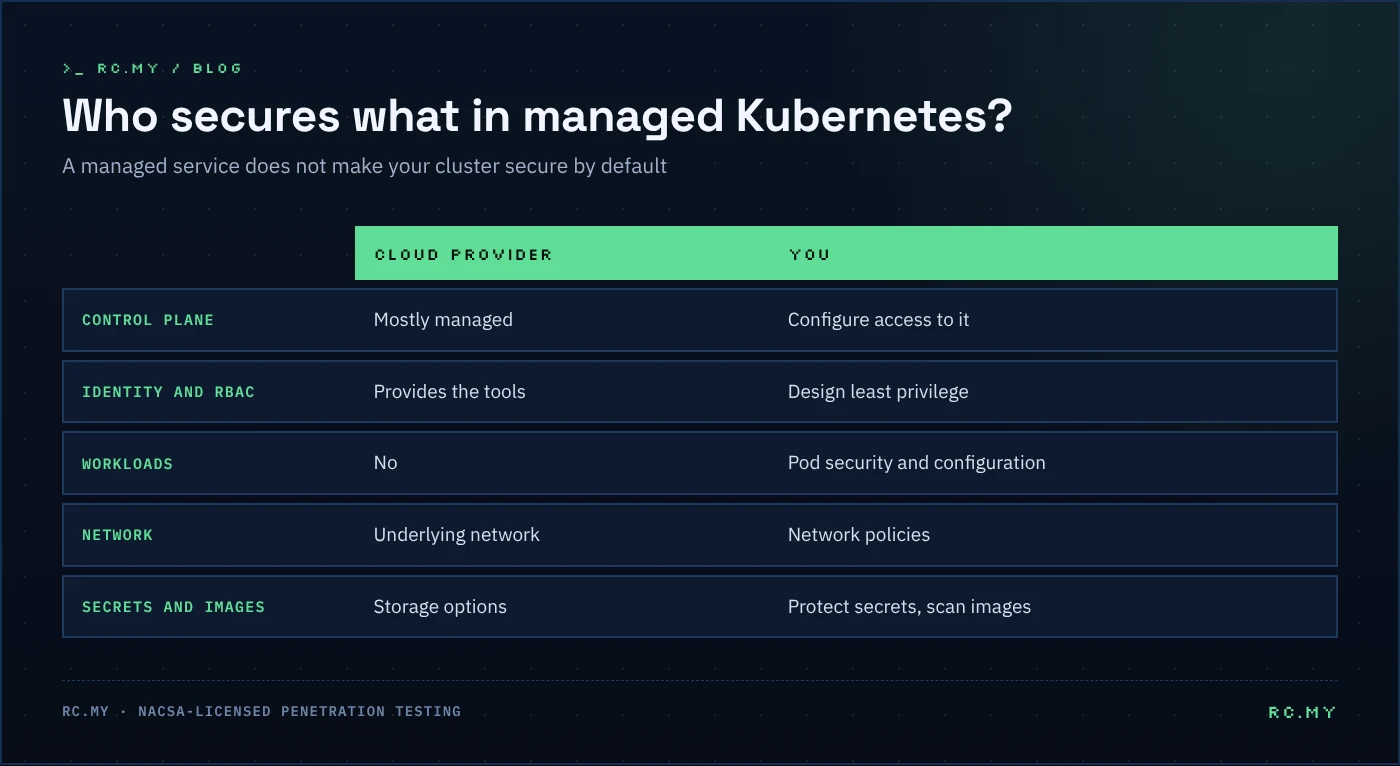
Understand the shared responsibility
With a managed service, the cloud provider secures much of the control plane. You remain responsible for identity and access, workload configuration, network policies, secrets and your container images. In a self-managed cluster, you own everything.
1. Secure access to the API server
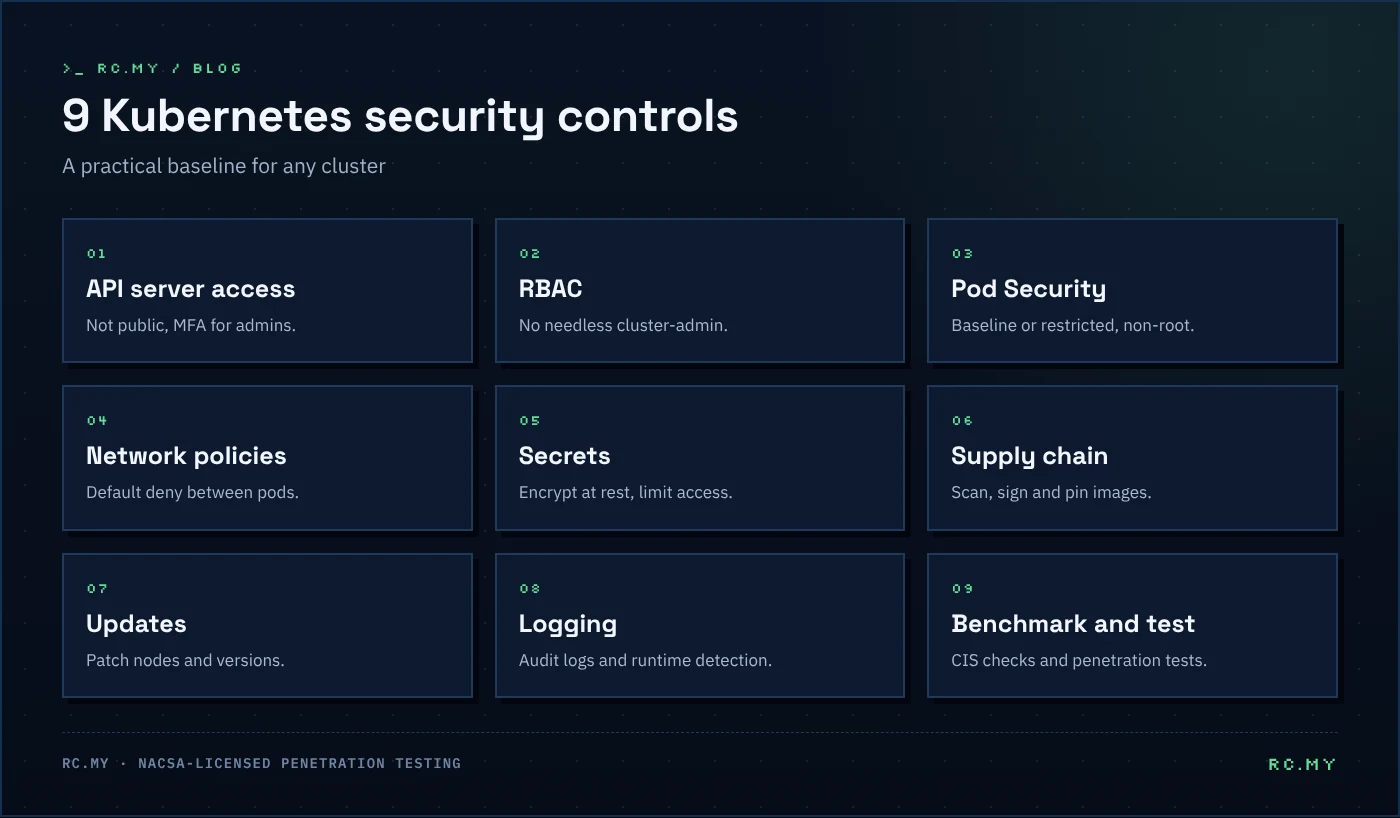
The Kubernetes API server controls the whole cluster, so treat it as a crown jewel.
- Do not expose the API server to the internet unless you must. Restrict access to known networks or a VPN.
- Use your organisation’s identity provider and multi-factor authentication for human access.
- Disable anonymous access and remove unused service account tokens.
2. Apply least privilege with RBAC
Role-based access control (RBAC) decides who can do what.
- Avoid granting
cluster-adminto users or service accounts. - Prefer namespaced
Roleobjects overClusterRolewhere possible. - Review bindings regularly and remove stale accounts.
- Give each application its own service account with only the permissions it needs.
3. Harden workloads with Pod Security Standards
Kubernetes defines three Pod Security Standards: privileged, baseline and restricted. The built-in Pod Security Admission controller can enforce them per namespace.
- Enforce at least baseline everywhere and restricted for application namespaces.
- Run containers as a non-root user with a read-only root filesystem.
- Drop Linux capabilities and disallow privilege escalation.
- Never mount the host filesystem or Docker socket into application pods.
4. Segment the network
By default, every pod can talk to every other pod.
- Use NetworkPolicies to allow only the traffic each service needs, starting with a default-deny policy per namespace.
- Make sure your CNI plugin actually enforces NetworkPolicies.
- Restrict egress so a compromised pod cannot freely reach the internet or cloud metadata endpoints.
5. Protect secrets
- Enable encryption at rest for Secrets in etcd.
- Limit which service accounts can read which secrets.
- Consider an external secret manager, such as HashiCorp Vault or your cloud provider’s secret store.
- Never bake secrets into container images or Git repositories.
6. Secure the supply chain
Most real-world Kubernetes incidents start with what you deploy.
- Scan images for vulnerabilities in your pipeline, for example with Trivy.
- Use minimal, trusted base images and pin them by digest.
- Sign images and verify signatures at deploy time with an admission policy.
- Use policy engines such as Kyverno or OPA Gatekeeper to block risky configurations.
Our guide to DevSecOps in CI/CD explains how to automate these checks.
7. Keep nodes and versions up to date
- Upgrade Kubernetes regularly. Each minor version receives patches for a limited time only.
- Patch node operating systems and container runtimes.
- Use a hardened, minimal node image where possible.
8. Log, monitor and detect
- Enable Kubernetes audit logging and send logs to a central system.
- Monitor for suspicious behaviour at runtime, for example with Falco.
- Alert on unusual events such as new privileged pods, exec into containers or changes to RBAC.
9. Benchmark and test
- Check your cluster against the CIS Kubernetes Benchmark with a tool such as kube-bench.
- Include your cluster and its workloads in regular penetration tests. Testers look for exposed dashboards, over-privileged service accounts and paths from a compromised pod to the node or cloud account.
Quick Kubernetes security checklist
- API server not publicly exposed, with MFA for admins
- No unnecessary
cluster-adminbindings - Pod Security Admission enforcing baseline or restricted
- Default-deny NetworkPolicies in place
- Secrets encrypted at rest and access limited
- Images scanned, signed and pinned
- Regular upgrades and node patching
- Audit logging and runtime detection enabled
- CIS benchmark and penetration test at least once a year
Frequently asked questions
Is a managed Kubernetes service secure by default?
It is more secure than a self-managed cluster with no hardening, but you are still responsible for access, workloads, network policies and images.
What is the most common Kubernetes security mistake?
Over-privileged access, such as broad cluster-admin rights or pods running as privileged with access to the host.
How often should a Kubernetes cluster be tested?
At least once a year and after major changes, with automated checks running continuously in your pipeline.
Secure your platform with RC.MY
RC.MY designs and deploys container platforms, from Docker and Kubernetes to Helm and Terraform, and tests them as a NACSA-licensed penetration testing provider. Explore our DevOps and infrastructure services, build skills with PARC Academy, or contact us.